
You can import bank transactions into CSMSTrack with ease.
1. Go to Book Keeping [ Menu] > Bank Account Transaction
2. Select Import Bank Transaction from Action button
3. Click on Download Bank Transaction Template
4. Open Template file and copy your bank transactions. Update your data if necessary.
5. Proceed with the following:
* Select the Transaction Date column
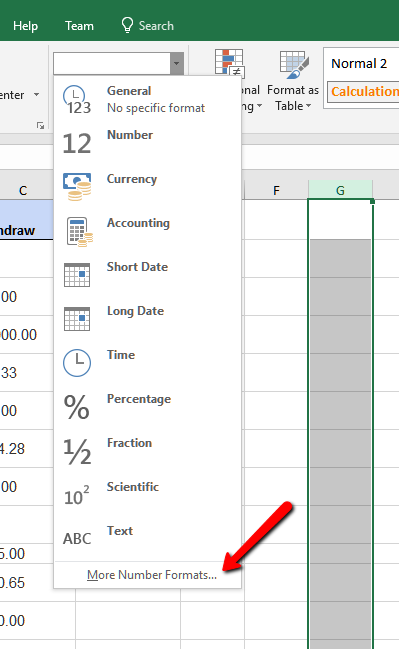
* Click on the Format Dropdown and click on More Number Formats
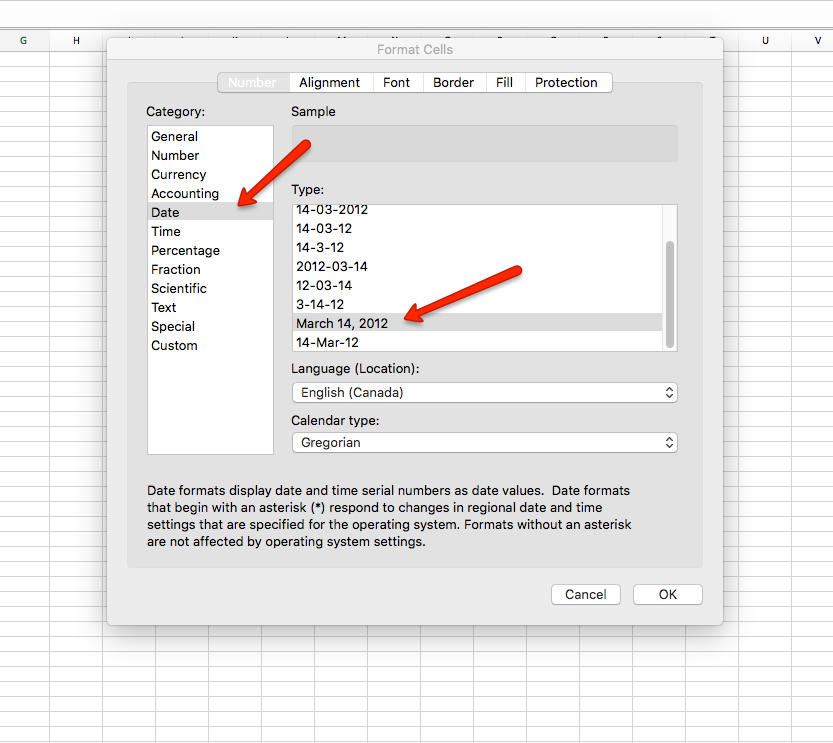
* Select Number Tab, under Category, click Date, under Type , select March 14, 2012 format
6. On Bank Transaction Import page, upload your prepared Bank Transaction with proper formatted Transaction Date and click Import Bank Transaction
7. If you have error during import process, CSMSTrack will let you know the status and import report. The report is useful to understand transactions may not be imported.
8. You can review the report and fix trouble transactions. Delete unnesscery transactions and re-upload the report file to import again. Doing this saves you time because you do not have to use the original file and find out which transactions need to be fixed.